Shooting Specifications & Battery Life
Camera Tutorial
Mobile App Tutorial
QooCam 3 Ultra User Manual
2024-12-19
QooCam 3 Ultra User Manual Traditional Chinese
2024-12-19
QooCam 3 울트라 사용 설명서
2024-12-19
QooCam 3 Ultra Руководство пользователя
2024-12-19
QooCam 3 Ultra Manuel d'utilisateur
2024-12-19
QooCam 3 Ultra Manuale dell'utente
2024-12-19
QooCam 3 Ultra Manual del usuario
2024-12-19
QooCam 3 Ultra Kullanıcı Kılavuzu
2025-04-17
QooCam 3 Ultra Benutzerhandbuch
2024-12-19
QooCam Battery QCMB5037 User Manual
2024-09-09
QooCam 3 Ultra Battery Charging Case User Guide
2024-08-13
QooCam 3 Series Lens Protector User Manual
2024-11-19


QooCam 3 Ultra Quick Start

Qoocam 3 Ultra App Connection Tutorial

QooCam 3 App Video Editing

QooCam 3 Ultra In-Camera Stitching

QooCam Studio 2025 Introduction

QooCam 3 Ultra Camera Firmware

2025-08-17
Available for in-device update
Firmware V1.1.6.6
1. Optimized red color performance in K-log mode.
2. Fixed known issues.

A material Production and Processing tool for QooCam and QooCam 8K. Faster rendering speed. Higher render quality. This version does not support QooCam(Mark 1)'s VR180 material.

2025-11-07
3.3.0.18
1. Added support for AI Lens Patch (based on VR180 3D mode).
2. Added support for switching between 2D and 3D modes via the UI.
3. Added support for manual parallax offset adjustment (based on VR180 3D mode).
4. Optimized VR180 calibration (based on VR180 3D mode).

2025-11-07
3.3.0.18
1. Added support for AI Lens Patch (based on VR180 3D mode).
2. Added support for switching between 2D and 3D modes via the UI.
3. Added support for manual parallax offset adjustment (based on VR180 3D mode).
4. Optimized VR180 calibration (based on VR180 3D mode).

QooCam 3 App is specifically designed for the consumer-grade cameras QooCam 3 and QooCam 3 Ultra, offering precise camera control and real-time preview functionality. Its user-friendly editing interface is equipped with a wide range of templates and filters, enhancing the shooting experience and helping you quickly create stunning videos. From shooting to editing to sharing, the app offers a seamless one-stop creative solution. * Support for QooCam 3 Ultra camera. * Brand new video editing interaction: Precise editing with keyframe addition and flexible perspective adjustment for a more creative experience.
2026-03-27
V3.0.2
1. 【Template Editing Upgrades】Added quick template switching, music/filter/aspect ratio adjustments, and clip volume editing for a faster, smoother workflow.
2. 【Motion Blur Effect】Automatically enabled for high-speed videos (≥8x), making scenes like cycling, flowing water, and bright light smoother and more natural.
3. 【Feedback Improvements】Added a log submission entry for faster issue diagnosis and more efficient feedback.
4. 【Experience Enhancements】 Fixed several known issues for more stable performance.
2026-03-27
V3.0.2
1. 【Template Editing Upgrades】Added quick template switching, music/filter/aspect ratio adjustments, and clip volume editing for a faster, smoother workflow.
2. 【Motion Blur Effect】Automatically enabled for high-speed videos (≥8x), making scenes like cycling, flowing water, and bright light smoother and more natural.
3. 【Experience Enhancements】 Fixed several known issues for more stable performance.

You can connect your QooCam 3 Ultra to your Mac device via USB cable to transfer files with Android File Transfer.
2024-08-01
mac OS 1.0.0
Used to transfer files between Mac and QooCam 3 Ultra.

Kandao Raw+ uses computational photography techniques, similar to what we are seeing in many high-end smartphones, to create images with increased detail and dynamic range, as well as lower noise levels. To achieve that it combines a burst of Raw images into one single DNG file that can then be further edited with a Raw converter of your choice.
What are the micro SD cards available to QooCam 3 Ultra?
QooCam 3 Ultra supports the extended use of external microSD cards with a maximum capacity of 1TB. It is recommended to use a microSD card with a read/write speed of UHS-I Class 3 (U3) and above.
Recommended microSD cards are as follows.
SanDisk Extreme 32GB V30 UHS-I Speed Grade 3
SanDisk Extreme 64GB V30 UHS-I Speed Grade 3
SanDisk Extreme 64GB V30 UHS-I Speed Grade 3
SanDisk Extreme 256GB V30 UHS-I Speed Grade 3
SanDisk Extreme pro 1TB V30 UHS-I Speed Grade 3
Kingston Canvas Go!Plus 64GB UHS-I Speed Grade 3
Kingston Canvas Go!Plus 128GB UHS-I Speed Grade 3
Kingston Canvas Go!Plus 256GB UHS-I Speed Grade 3
SAMSUNG Pro Plus 128GB UHS-I Speed Grade 3
SAMSUNG Pro Plus 256GB UHS-I Speed Grade 3
Lexar 1066X 64GB UHS-I Speed Grade 3
Lexar 1066X 128GB UHS-I Speed Grade 3
Lexar 1066X 256GB UHS-I Speed Grade 3
The Camera Does Not Recognize the SD Card. What Could Be the Reasons?
When the camera fails to recognize the SD card, you can try the following solutions:
Use a computer to format the micro SD card to exFAT format.
The performance of the micro SD card may degrade over time, affecting the camera's ability to save media files. Consider replacing the SD card to resolve the issue. Generally, we recommend using a micro SD card with a read/write speed of UHS-I Class 3 (U3) or higher.
How to Transfer Captured Photos or Videos to Your Mobile Phone or Computer?
1. Transfer to Mobile Phone:
By connecting the camera in the QooCam 3 App, you can play back the captured photos and videos by clicking the playback icon or the album icon in the QooCam 3 App. Click the download button to directly download the media to your mobile device.
2. Transfer to Computer:
① Turn on the camera, connect it to the computer using a USB cable, then copy the files from the camera to the computer.
② Remove the SD card from the camera and use a card reader to copy the files to the computer.
How can I transfer files from the camera to the computer more quickly?
1. Please check the USB data cable and it is recommended to use the USB data cable provided with the camera or another cable that meets USB 3.1 Gen2 (USB 10Gbps) specifications.
2. When connecting to your computer for file transfer, it is recommended to use the copy method instead of the cut method to achieve the maximum transfer speed. The transfer speed for videos and large files is approximately 200MB/s, while for photos and small files, it is about 120MB/s.
Why can’t I edit the footage from the camera on a Mac system?
When connecting the QooCam 3 Ultra to a Mac system, you need to use the "Android File Transfer" tool for file transfer in MTP mode. In this mode, files stored in the camera and on the SD card cannot be directly played with a video player or imported into QooCam Studio for editing. You need to copy the footage to your local hard drive first.
If you prefer to use the SD card as a standard USB storage device, it's recommended to remove the SD card and connect it to the Mac system using a card reader.
How can I transfer files from the internal storage and external SD card of QooCam 3 Ultra?
QooCam 3 Ultra supports connecting to a computer to directly read both internal and external storage.
For Mac systems:
You can use a tool called "Android File Transfer" to export QooCam 3 Ultra footage to your Mac. This convenient software helps transfer files between QooCam 3 Ultra and Mac.
You can download it via this link: https://v3.kandaovr.com/resource/kandao/app/2024/08/01/16/21/13/AndroidFileTransfer.dmg and follow the software instructions to export your footage smoothly.
Why Does Saving DNG Files Take Some Time?
The file write speed is generally related to the speed of the storage card and the camera system. We recommend using a higher performance storage card to improve file saving speed.When shooting DNG/DNG8 with QooCam 3 Ultra, we recommend that you prioritize saving with the QooCam 3 Ultra's Built-in Storage.
How Long Can the Built-in Storage of QooCam 3 Ultra Record Video or How Many Photos Can It Store?
It can store approximately 2,495 photos in 96MP JPG format or about 450 photos in DNG+JPG format.
It can store approximately 9,225 photos in 24MP JPG format or about 1,770 photos in DNG+JPG format.
It can record approximately 137 minutes of video at a standard bitrate (around 100Mbps) or about 91 minutes of video at a high bitrate (around 150Mbps).
What are the system requirements for QooCam 3 APP?
Android
Processor: Qualcomm Snapdragon 855 or higher (e.g. Samsung Galaxy S10, Xiaomi 9 or newer)
Processor: Exynos 2200 or higher (e.g. Samsung Galaxy S22, S22 Ultra or newer)
Operating System: Android 9.0 or higher
Note:
iOS
Processor: A12 or higher
Operating System: iOS 13.0 or higher
Compatible Models:
iPhone XS, iPhone XS Max, iPhone 11, iPhone 11 Pro, iPhone 11 Pro Max, iPhone 12, iPhone 12 Pro, iPhone 12 Pro Max, iPhone 12 mini, iPhone 13, iPhone 13 Pro, iPhone 13 Pro Max, iPhone 13 mini, iPhone 14, iPhone 14 Plus, iPhone 14 Pro, iPhone 14 Pro Max, iPhone 15, iPhone 15 Plus, iPhone 15 Pro, iPhone 15 Pro Max, iPhone 16, iPhone 16 Plus, iPhone 16 Pro, iPhone 16 Pro Max, iPad Air (2020), iPad Pro, and newer.
How far can the camera's Wi-Fi connection reach?
The Wi-Fi control range can reach about 80 meters under ideal conditions.
What Could Be the Reasons QooCam 3 App Cannot Connect to the Camera?
If QooCam 3 Ultra cannot connect to the QooCam 3 App, please follow these steps:
1. Ensure that the Wi-Fi, Bluetooth, and location services on the mobile device are enabled.
2. Ensure that the QooCam 3 App is updated to the latest version.
3. Ensure that the firmware of QooCam 3 Ultra is updated to the latest version.
4. For Android phones, ensure that the QooCam 3 App has the following permissions enabled:
① Bluetooth Permission: To obtain the device information of QooCam 3 Ultra for establishing a wireless connection.
② WLAN Permission: To establish a WLAN connection between the Android phone and QooCam 3 Ultra.
③ Location Permission: To ensure the phone can search for nearby wireless devices.
5. For iPhones, ensure that the QooCam 3 App has the following permissions enabled:
① Bluetooth Permission: To obtain the device information of QooCam 3 Ultra for establishing a wireless connection.
② Wireless Data Permission: To establish a wireless connection between the iPhone and QooCam 3 Ultra.
③ Local Network Permission: To ensure the phone and QooCam 3 Ultra can communicate on the same network.
④ Location Permission: To ensure the phone can search for nearby wireless devices.
6. Disable any network-related settings on the phone, such as dual WLAN acceleration, WLAN+ intelligent switching, etc.
How to Connect the Phone and Camera?
Please search for the "QooCam 3" App in the app store on your mobile device or scan the QR code below to install the QooCam 3 App.
You can connect the phone and camera using the following two methods:
Method 1: Connect the Mobile Device to the QooCam 3 Ultra Camera Hotspot via QooCam 3 App
Turn on the QooCam 3 Ultra camera and ensure that the "Network Connection - Camera Hotspot" setting is enabled in the camera settings.
Enable Wi-Fi, Bluetooth, and location services on the mobile device.
Open the QooCam 3 App, click the "Device Connection" icon 📷, and follow the instructions on the QooCam 3 App interface to connect the camera.
Note: You need to allow the QooCam 3 App to access the mobile device's Wi-Fi, Bluetooth, and location services permissions.
Method 2: Connect the Mobile Device and Camera to the Same WLAN/Ethernet Network
Enable Wi-Fi and location services on the mobile device, and connect to a secure and trusted WLAN/Ethernet network.
Turn on the QooCam 3 Ultra camera, enable the "Network Connection - WLAN" setting in the camera settings, and connect to the same WLAN that the mobile device is connected to.
Ensure that there are no network restrictions between the mobile device and QooCam 3 Ultra on this network, and that they can communicate with each other.
Open the QooCam 3 App, click the "Device Connection" icon 📷, and follow the instructions on the QooCam 3 App interface to connect the camera.
Note: You need to allow the QooCam 3 App to access the mobile device's Wi-Fi, Bluetooth, and location services permissions.
Does QooCam 3 Ultra Support Wi-Fi and Bluetooth Connections?
Yes, QooCam 3 Ultra supports Wi-Fi 6 (802.11a/b/g/n/ac/ax) and Bluetooth BLE 5.2.
QooCam 3 Ultra will use Bluetooth to provide device information to the QooCam 3 App to establish a Wi-Fi connection with the phone. At the same time, QooCam 3 Ultra also supports connecting audio input devices via Bluetooth.
Wi-Fi supports connecting to wireless local area networks (WLAN).
What are the battery capacity and endurance of the camera?
The QooCam 3 Ultra has a battery capacity of 2280mAh. When shooting, it can be connected to an external power bank. Please ensure that the external power source supports PD or QC protocols, with an output of 9V/2A or 5V/3A. (Currently, the QooCam 3 Ultra requires the battery to be inserted even when using an external power source.)
Note: The camera is not dustproof or waterproof when the USB protective cover is open for charging.
Under laboratory conditions:
When recording at 10-bit 8K@24/25/30fps, 5.7K@50/60fps, 4K@100/120fps, or 3.4K@100fps in 180° single-lens mode, the battery lasts approximately 50 minutes.
When recording at 10-bit 5.7K@24/25/30fps or 4K@50/60fps in 180° single-lens mode, the battery lasts approximately 60 minutes.
When recording at 10-bit 4K@24/25/30fps in 180° single-lens mode, the battery lasts approximately 100 minutes.
Can an external power source be connected during shooting?
Yes, an external power source using the PD (Power Delivery) or QC (Quick Charge) protocol (meeting the power supply requirements of 9V 2A / 5V 3A) can be used to power the Qoocam 3 Ultra. When using external power, the camera can continue to operate even if the battery is removed, but we strongly recommend keeping the battery in the camera to prevent sudden power loss due to a loose external power cable or unstable power supply, which could result in file damage.
Note: The camera is not dustproof or waterproof when the USB protection cover is open for charging.
Why does the indicator light flash blue once when powering on?
When the battery level is too low to start the camera, a short press of the power button will cause the indicator light to flash blue once
Does the QooCam 3 Ultra support fast charging chargers?What specifications of charger does the QooCam 3 Ultra need?
It supports standard PD/QC power adapters.Please use a USB Type-C charger that supports PD/QC protocols, with an output power of 9V/2A or 5V/3A.
How long does it take to fully charge the QooCam 3 Ultra?
In a laboratory environment, with the camera powered off and using a standard PD charger, it takes approximately 75 minutes to fully charge the battery. To charge to 50%, it takes about 30 minutes, and to reach 80%, it takes around 45 minutes.
How to Update Camera Firmware?
There are two methods to update the camera firmware:
1. Update via the QooCam 3 App
① Download the QooCam 3 App from your mobile device's app store.
② Follow the instructions displayed in the QooCam 3 App to connect the camera to your mobile device. If a new camera firmware is available, the QooCam 3 App will guide you through the installation process.
2. Update via QooCam 3 Ultra's Wireless Local Area Network (WLAN)
① Go to the QooCam 3 Ultra camera settings and turn on "Network Connection - WLAN."
② Select a secure and trusted available network, connect by entering the WLAN password.
③ After completing the connection to the Wireless LAN, go to the camera settings, navigate to "About Camera - Update," and tap to check for updates to begin the firmware update process.
QooCam 3 Ultra supports which shooting modes?
The QooCam 3 Ultra supports two types of shooting modes: photo and video:
Photo Mode includes:
Panoramic Photo
Interval Photo
DNG8
AEB (Automatic Exposure Bracketing) Mode
Video Mode includes:
Panoramic Video
Timelapse
Loop Recording
Users can choose different modes based on their requirements.
How to switch shooting modes?
There are two ways to switch shooting modes:
Tap the shooting mode icon at the bottom left of the screen to select the shooting mode.
In preview mode, press the mode button briefly to switch the shooting mode.
QooCam 3 Ultra Color Range Detailed Description
QooCam 3 Ultra offers several color range options, each with its unique features. Users can select the appropriate mode based on their specific needs:
8bit Rec. 709 Normal
This mode utilizes the Rec. 709 color space and Gamma, offering the best compatibility with major video platforms. However, due to its 8-bit color depth, it provides limited flexibility for color grading, making it suitable for content that requires minimal post-production.
2. 10bit HLG Normal
The HLG Normal mode is based on the standard Hybrid Log-Gamma (HLG) and incorporates Kandao's color style preferences. It delivers excellent visual quality without requiring post-production, making it more suitable for HDR shooting scenarios where no further editing is needed.
10bit HLG Pro
The HLG Pro mode uses the standard "Hybrid Log-Gamma" (HLG). Compared to the 10bit HLG Normal mode, it is better suited for HDR shooting that involves post-production workflows.
10bit K-Log
The 10bit K-Log mode is specifically designed to maximize dynamic range, making it ideal for professional post-production workflows. Similar to Log modes on other DSLRs, K-Log produces flat colors with low contrast while retaining more details, offering extensive flexibility for color grading. This mode is best suited for professional users seeking greater latitude in color and exposure adjustments during post-production.
How to Set Up the Q Button for Quick Switching Between Common Shooting Modes
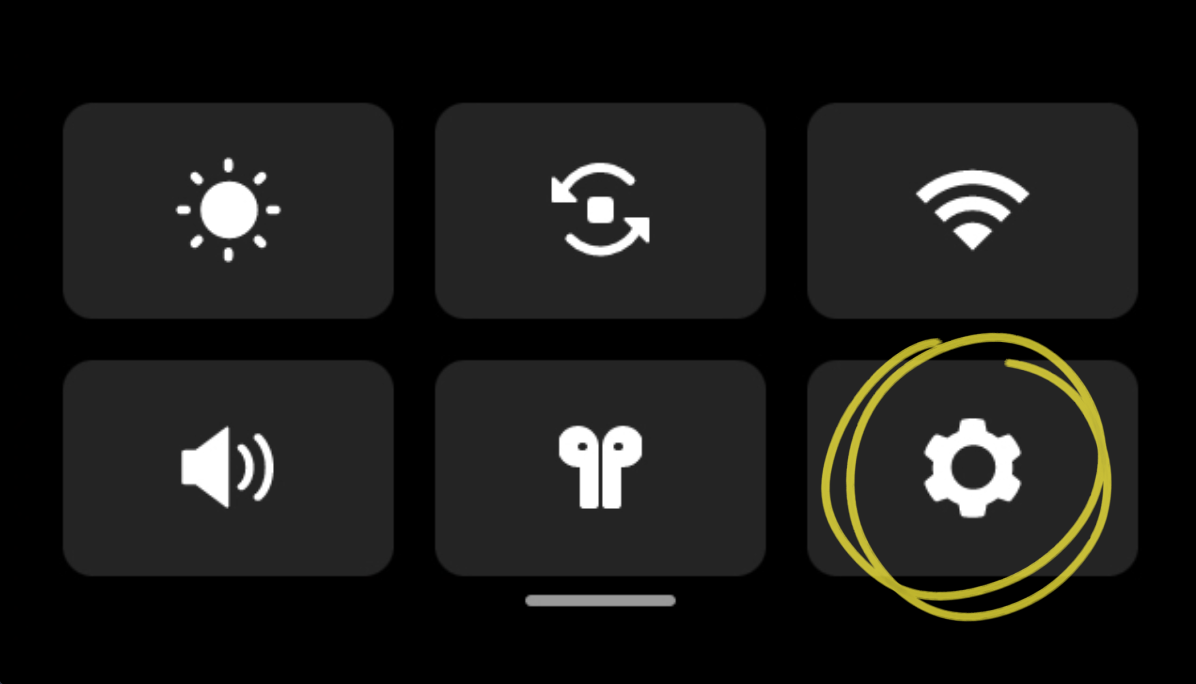
1. Access the 【Settings】
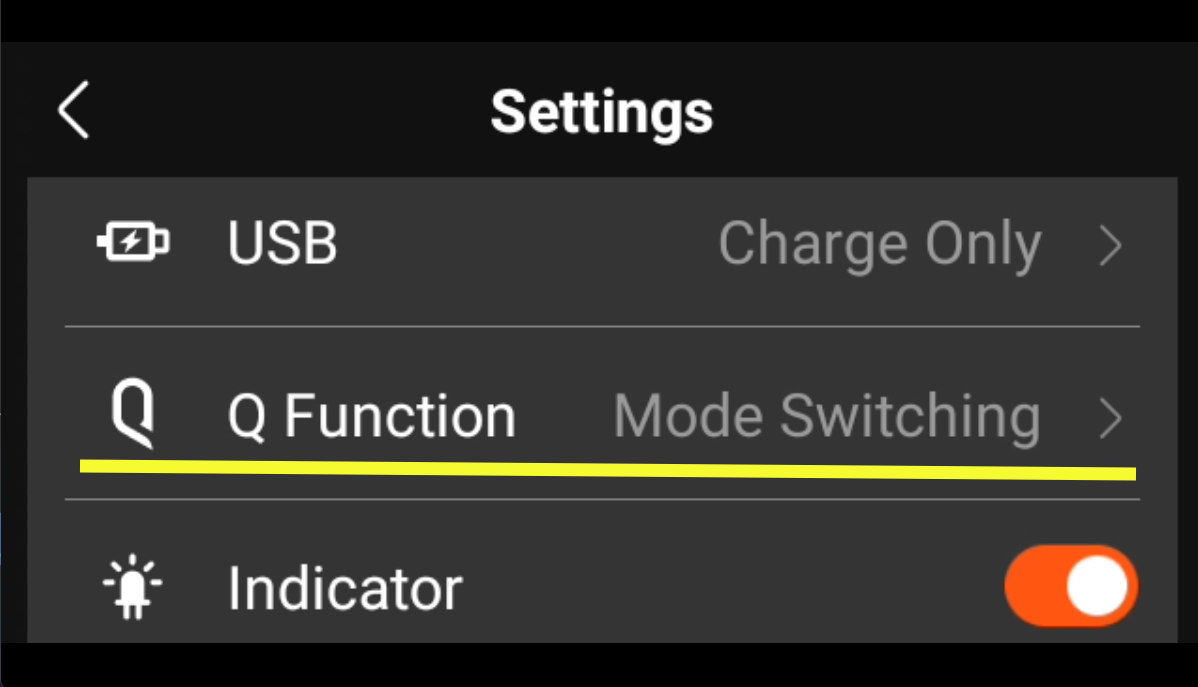
2. Access the 【Q Function】
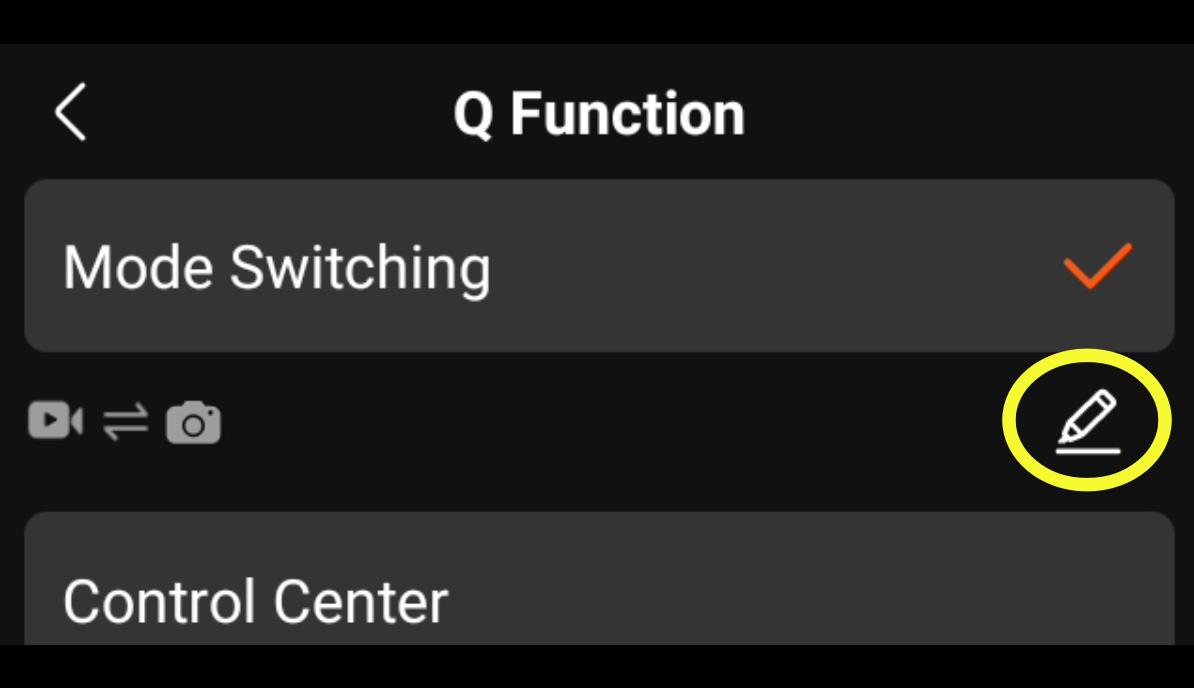
3. Press the【Edit】icon below 【Mode Switching】
4. Select the first common shooting mode and then press 【Next】
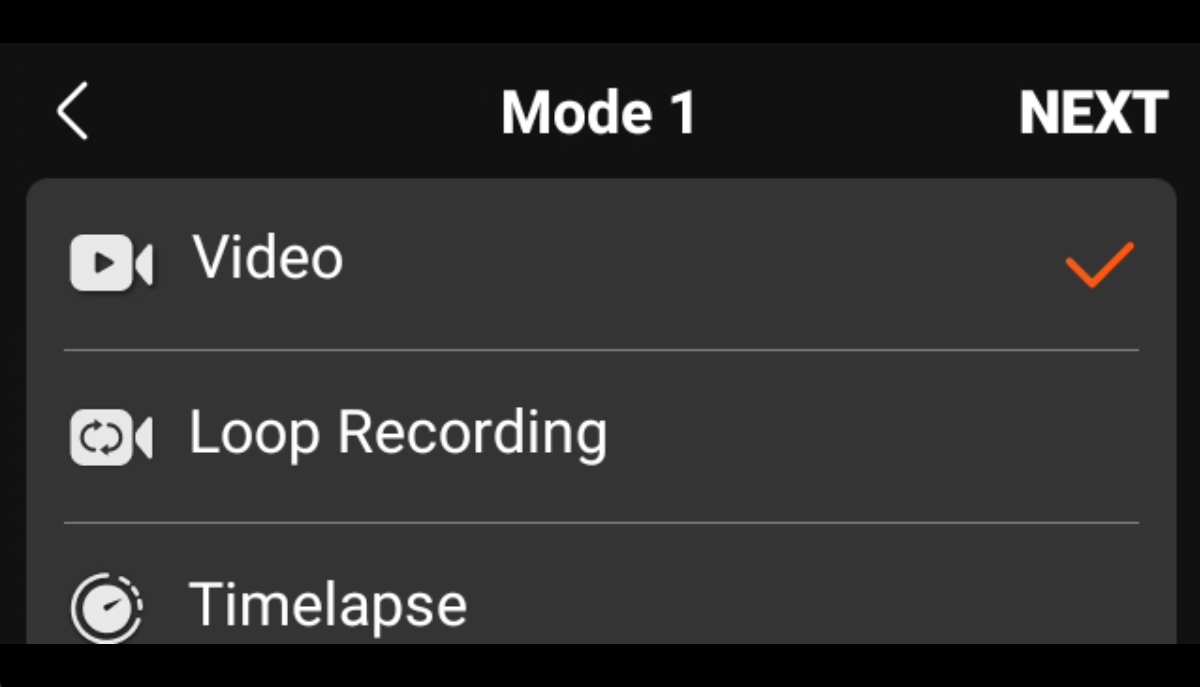
5. Select the second common shooting mode and then press 【OK】
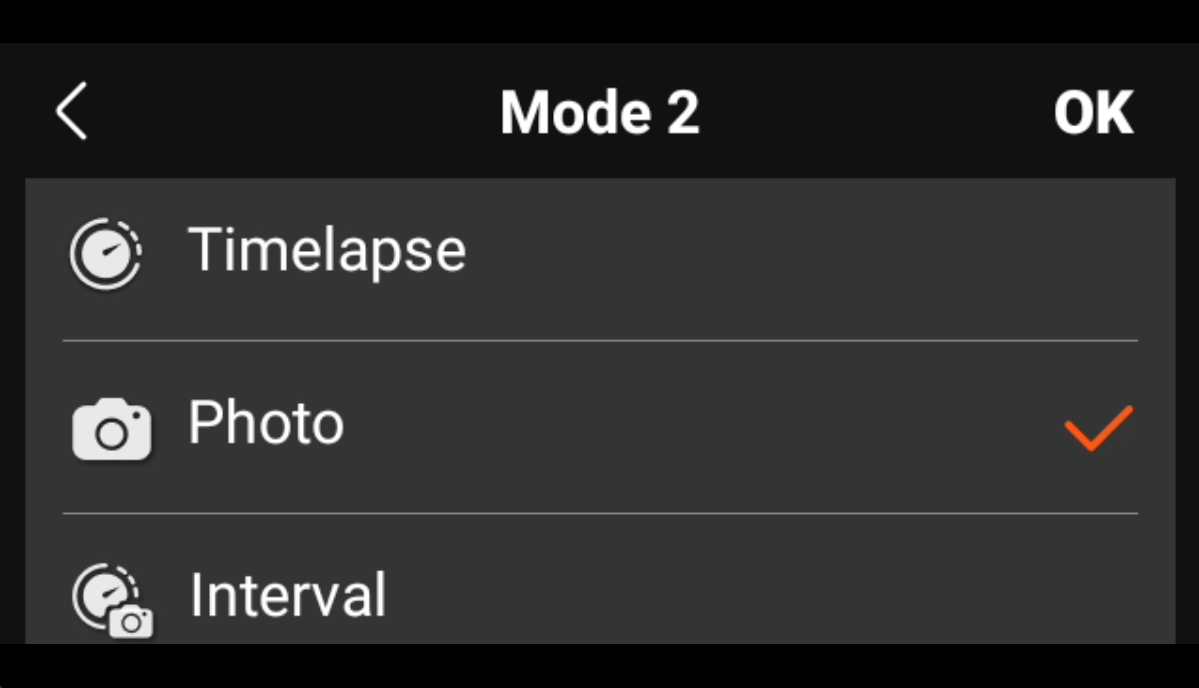
Now you can switch quickly between common shooting modes by pressing the Q button.
What is the maximum photo resolution that QooCam 3 Ultra can capture?
The QooCam 3 Ultra can capture up to 96-megapixel (13888×6944) 14K resolution photos.
What is the highest video specification for QooCam 3 Ultra?
Panoramic Video:
The QooCam 3 Ultra can record the highest specification of 8K@30FPS 10bit panoramic video, with a resolution of 7680x3840.
The QooCam 3 Ultra can record the highest specification of 5.7K@60FPS 10bit panoramic video, with a resolution of 5760x2880.
The QooCam 3 Ultra can record the highest specification of 4K@120FPS 10bit panoramic video, with a resolution of 3840x1920.
180° Single-Lens Mode:
QooCam 3 Ultra can record 10bit single-lens mode videos at a maximum specification of 4K@60FPS, with a resolution of 3840x3840.
QooCam 3 Ultra can record 10bit single-lens mode videos at a maximum specification of 3.4K@100FPS, with a resolution of 3472x3472.
What is the maximum duration for a single video file on the QooCam 3 Ultra?
QooCam 3 Ultra can segment a single video into parts or record without time limits.
The QooCam 3 Ultra allows you to adjust the "Video Segments" setting in the camera settings, which can be set to 10 minutes/20 minutes/30 minutes/No Segmentation for video storage. For example, if the video segment is set to 10 minutes, a 26-minute continuous recording will be saved as 2 separate video files: one 10-minute file, one 10-minute file, and one 6-minute file, with the 3 video clips being continuous.
Does the QooCam 3 Ultra support image stabilization? How to enable the image stabilization feature?
Yes, the QooCam 3 Ultra is equipped with a six-axis gyroscope. You can use the powerful image stabilization feature through the mobile app QooCam 3 App or the desktop software QooCam Studio to achieve cinema-level stabilized footage on the video files recorded by the QooCam 3 Ultra.
Does the QooCam 3 Ultra support shooting modes like time-lapse and HDR?
It supports time-lapse photography and is capable of shooting in 10bit BT.2020 HLG specification.
Does QooCam 3 Ultra support manual adjustment of shutter speed, ISO, and other parameters?
QooCam 3 Ultra allows users to manually set shutter speed and ISO in manual exposure mode for precise control over exposure effects. It also supports shutter priority/ISO priority semi-automatic modes for intelligent exposure optimization.
What is the focal length of the QooCam 3 Ultra camera?
35mm equivalent focal length: 9.36mm
What is the sensor size of QooCam 3 Ultra?
The sensor size is 1/1.7 inches.
What is the ISO range of QooCam 3 Ultra?
The ISO range of QooCam 3 Ultra is 100 to 6400.
When DR-Boost is enabled, the ISO range is 6 to 100.
What is the shutter speed range of QooCam 3 Ultra?
For photos: 1/6400s to 50s
For videos: 1/6400s to the frame rate limit (e.g., for 8@K30fps, it is 1/6400s to 1/30s; for 4K@120fps, it is 1/6400s to 1/120s)
When DR-Boost is enabled, only videos below 30fps and 24MP photos are supported:
For photos: the shutter speed ranges from 1/800s to 30s.
For videos: the shutter speed ranges from 1/6400s to the frame rate limit shutter (for example, for 8K@30fps, it is 1/6400s to 1/30s; for 4K@25fps, it is 1/6400s to 1/25s).
Detailed Explanation of Interval Shooting Time
The interval time here refers to the time between the start of exposure for one image and the start of exposure for the next image.
Minimum Interval Time:
The minimum interval time is determined by the storage device you select (write speed), the resolution, the file format saved, and the (maximum) shutter speed.
Their relationship can be understood as:
Interval Time = T1 (Maximum Shutter Time + 2 seconds) or T2 (Selected File Format Size / Storage Device Write Speed * 120%).
The larger value between the two determines the interval time.
What is the video encoding format of QooCam 3 Ultra?
mp4(H.265)
Is it normal to not have a preview screen while shooting?
Yes, this is normal. When the QooCam 3 Ultra is recording 10bit video, the preview screen will be turned off.
Will the image quality of QooCam 3 Ultra shooting at 5.7K@60fps be better than that of QooCam 8K shooting at the same 5.7K@60fps?
QooCam 3 Ultra's 5.7K 60fps is downsampled from 8K 60fps, resulting in a clearer image. Coupled with the F1.6 large aperture and a newly upgraded image processor, the image quality is superior.
Will it support an upgrade to 8K 60FPS in the future?
No.
Does QooCam 3 Ultra have a built-in Google Street View function?
The videos shot by the camera come with GPS data. In QooCam Studio, you can export GPX files for Google Map video upload.
Why is the interval between photos taken with the QooCam 3 Ultra displayed differently from the settings in LRTimelapse?
LRTimelapse calculates the interval based on the creation time of the photos, while the QooCam 3 Ultra’s setting is for the interval between two shutter releases, which includes the exposure time. If there are significant changes in ambient brightness during interval shooting, the shutter speed can vary between shots, affecting the time between when the photos are created and saved. This can result in uneven intervals being displayed in LRTimelapse. However, the interval between when the photos start exposing is uniform.
For example, if the interval is set to 25 seconds, and exposure changes cause variations in shutter speed, you may see that the total time between photos 002-006 divided by the number of photos still averages to the set 25-second interval.

Does the camera support USB and HDMI output?
Currently, it does not support USB and HDMI output.
Does the QooCam 3 Ultra have a Thunderbolt interface?
No, it features a USB 3.1 Gen2(USB 10Gbps) interface with a theoretical speed of 10Gbps.
What languages does QooCam 3 Ultra support?
Currently supports Simplified Chinese, Traditional Chinese, English, and Japanese.
Why can QooCam 3 Ultra start so quickly?
We developed a special quick start function for QooCam 3 Ultra, offering two startup modes: quick start and slow start. Slow start takes about 20 seconds, while quick start only takes 1 second.
QooCam 3 Ultra achieves this through a two-stage power-off mechanism. In the first stage, the camera shuts down all other components but retains DRAM, allowing for quick startup. If the camera is off for more than 8 hours or the battery is replaced, the DRAM is cleared, entering the second stage power-off. In this case, restarting QooCam 3 Ultra requires a slow start, but subsequent starts can use quick start.
Does QooCam 3 Ultra support underwater shooting without a case?
Due to the optical characteristics of panoramic cameras, stitching issues may occur when shooting underwater without a case. Therefore, we do not recommend underwater shooting without a case. The camera's waterproof design is meant to withstand impacts from surfing and waves, equivalent to the pressure at a depth of approximately 10 meters.
How is the waterproof performance of QooCam 3 Ultra?
QooCam 3 Ultra supports IP68 dustproof and waterproof rating.
Does QooCam 3 Ultra have a built-in cooling fan? How to turn it on?
There is a built-in fan, and by navigating to Camera Settings - Fan, you can choose from the following three modes:
Silent Recording: The fan is completely turned off during recording, ensuring no fan noise. Once the recording stops, it reverts to "Cooling Priority."
Silent Priority: During recording, the fan operates at a lower speed when the temperature rises, producing minimal noise. After recording stops, it reverts to "Cooling Priority."
Cooling Priority: In all situations, cooling efficiency is prioritized, with the fan running at a higher speed, resulting in louder noise.
Does the camera have built-in storage?
Yes, it has 128GB of built-in storage (approximately 98.2GB usable).
It also supports external micro SD card storage with UHS-I V30 speed class or higher, up to a maximum capacity of 1TB.
What are the status indicators of the QooCam 3 Ultra?
QooCam 3 Ultra has the following indicator statuses:
Ready/Idle: Green light stays on
Powering on: Green light flashes quickly twice
Taking a photo: Blue light flashes slowly once
Recording video: Blue light flashes slowly
Updating firmware: Red and blue lights flash alternately and slowly
Camera error: Red light flashes quickly
Charging: Red light stays on
Fully charged: Red light turns off
What is the weight of QooCam 3 Ultra?
296g (without battery)
336g (with battery)
Does the smaller sensor of QooCam 3 Ultra mean its low-light performance is worse compared to QooCam 3?
The sensor of QooCam 3 is slightly larger, but thanks to the much stronger processor of QooCam 3 Ultra, its overall performance in low-light conditions is better, along with the benefit of higher resolution.
QooCam Studio Graphics Card Performance Requirements
1. Check Your Computer Configuration Against QooCam Studio User Manual Recommendations Please ensure that your computer's configuration meets the recommended specifications as outlined in the QooCam Studio Tutorial
2. Make sure your graphics card driver is updated to the latest version. You can update your NVIDIA graphics card driver at the following address: NVIDIA Driver Downloads
3. For NVIDIA graphics card encoding and decoding capabilities, visit: NVIDIA Video Encode and Decode GPU Support Matrix
Detailed Explanation of Encoding and Decoding Capability Inquiry:
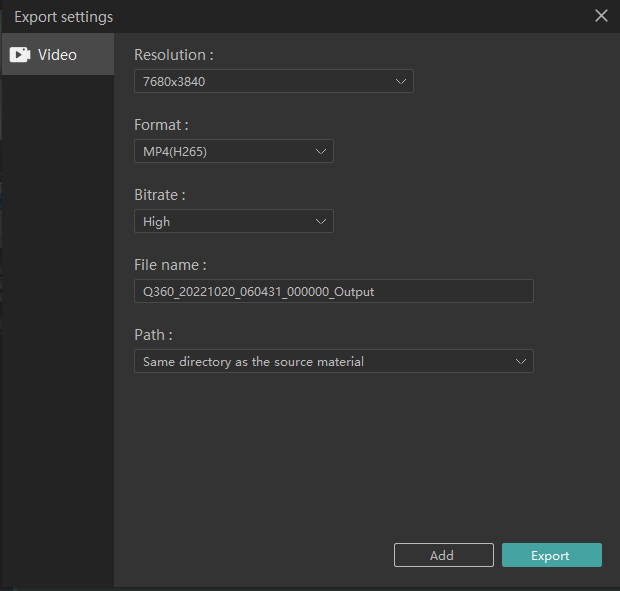
(1)In the QooCam Studio export, when the resolution is greater than 4K, the format needs to be selected "MP4(H265)" to support GPU acceleration.
(2)When the encoding capability of the graphics card is "YES", select this format in QooCam Studio to export the GPU acceleration.
For example: If your computer's GPU is a GeForce GTX 980 Ti, check the encoding capability of this graphics card.
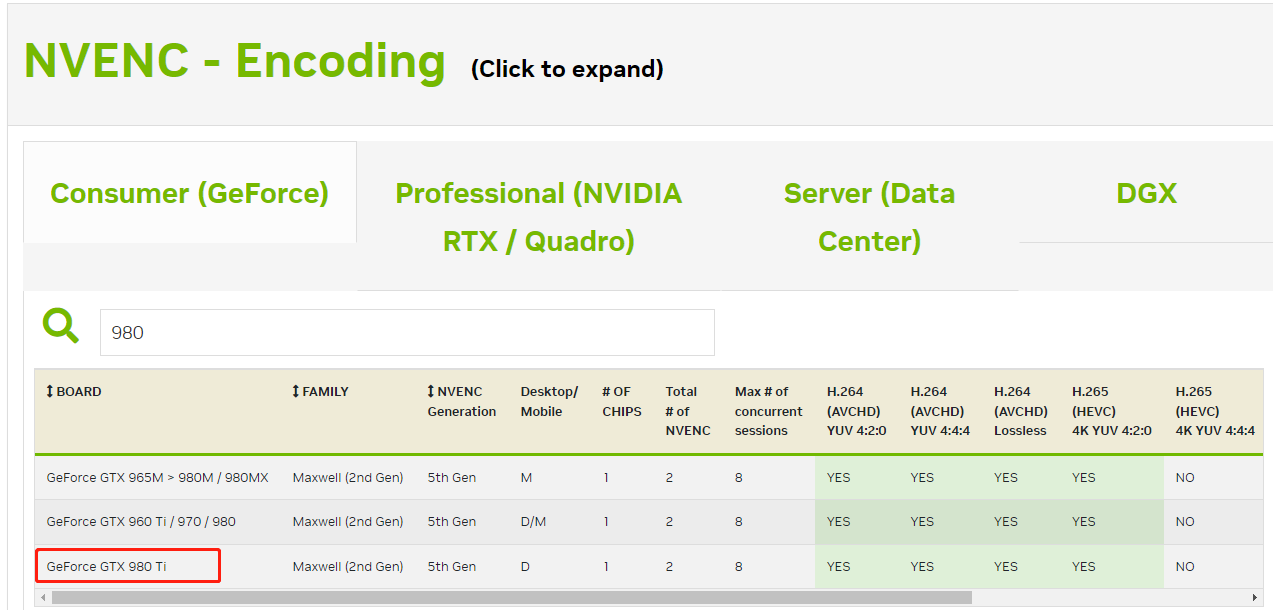
The enclosed sections correspond to the following meanings for QooCam Studio:
When exporting with H264 encoding format, when exporting with H265 encoding format (resolution ≤ 4K), when exporting with H265 encoding format (resolution ≥ 4K), and when exporting with HEVC encoding format (color depth 10bit, QooCam 3 Ultra and QooCam 8K can capture 10bit video), GPU acceleration is supported.
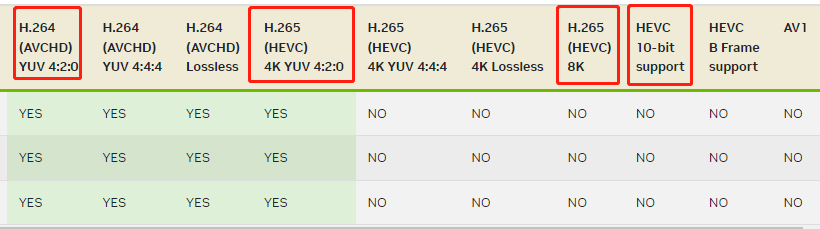
In this case, if the export resolution exceeds 4K, GPU acceleration cannot be used.
Will QooCam 3 Ultra be equipped with a convenient remote control?
Support common Bluetooth remote controls on the market.
Does the lens protector affect stitching quality or overall video quality?
We have optimized QooCam Studio to support stitching with lens protectors. The lens protector is made of PMMA acrylic, a material with very high light transmittance, so the impact on the image is minimal.
Is the lens protector for QooCam 3 Ultra compatible with QooCam 3?
Yes.
Are the motorcycle accessories for QooCam 3 compatible with QooCam 3 Ultra?
Yes.
What is the standard size of the tripod mount hole for the camera?
Standard 1/4 inch thread.
Does the camera support external microphones or other audio devices?
The QooCam 3 Ultra supports the direct use of commonly available external microphones. Once an external microphone is connected, the QooCam 3 Ultra will automatically default to using the audio input from that microphone.
The supported microphone types are as follows:
Bluetooth microphones, such as DJI mic 2;
USB microphones, such as the Rode Wireless Go series.
How to better edit in Final Cut Pro?
Final Cut Pro supports editing and exporting HLG videos, so you can confidently use Final Cut Pro for HDR video editing. It is important to use an HDR monitor to ensure proper color grading. You may need to pay attention to color space settings during editing to avoid using incorrect color space settings that could result in abnormal colors in the final output.
How to immerse QooCam 3 Ultra footage in Apple Vision Pro?
The 8K 360° VR HDR videos captured by QooCam 3 Ultra can be perfectly displayed on Apple Vision Pro. You can install the Kandao XR app on your Apple Vision Pro and transfer the HDR videos from QooCam 3 Ultra to Apple Vision Pro. Then you can watch the immersive HDR videos in the local video section of Kandao XR.
Is the QooCam 3 Ultra compatible with Pico?
Yes, it is supported. Please stitch and process the footage from the QooCam 3 Ultra using QooCam Studio or the QooCam App and export it in a format required by Pico. Place the stitched materials on Pico for use.
How to Apply Camera-specific Log-tuned LUTs to 3 Ultra Footage and Use them in QooCam Studio?
This tutorial is using DaVinci Resolve.
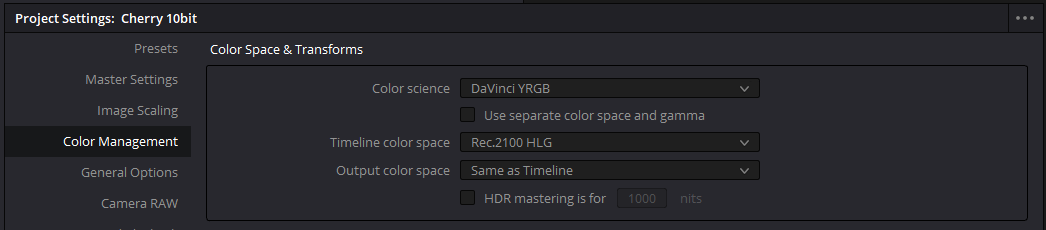
1. In 「Project Settings」, set the 「Color Management」 to 「DaVinci YRGB」, the 「Timeline Color Space」 to 「Rec.2100 HLG」, and the 「Output Color Space」 to 「Same as Timeline」.
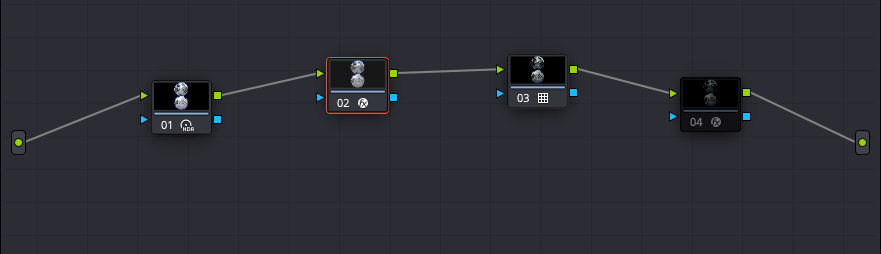
2. The process typically requires about 4 nodes.
Node 1:
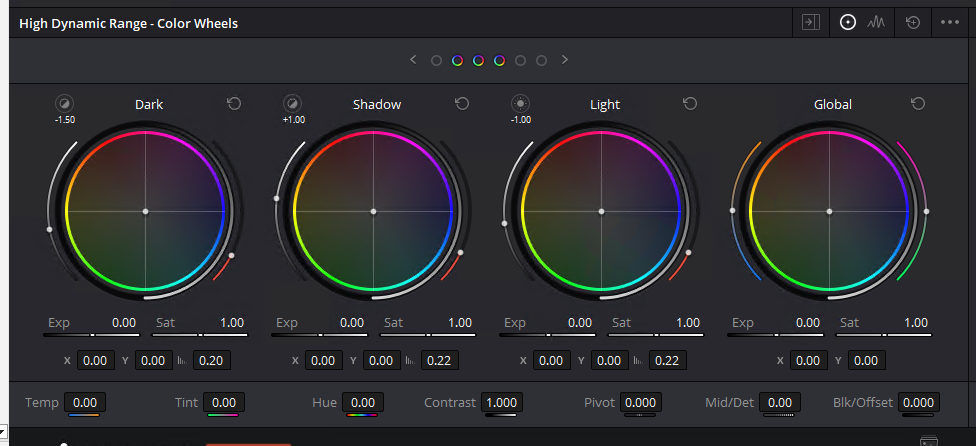
Adjust the brightness, using tools like「HDR – Color Wheels」. The reason that brightness adjustment is done in the first node is because different camera log gamma curves have different exposure biases, and after applying the LUT, the contrast usually changes significantly, making brightness adjustment fairly hard in later stage.
The standard HLG gamma of the 「QooCam 3 Ultra」 makes the brightness adjustment in Node 1 very precise.
Node 2:
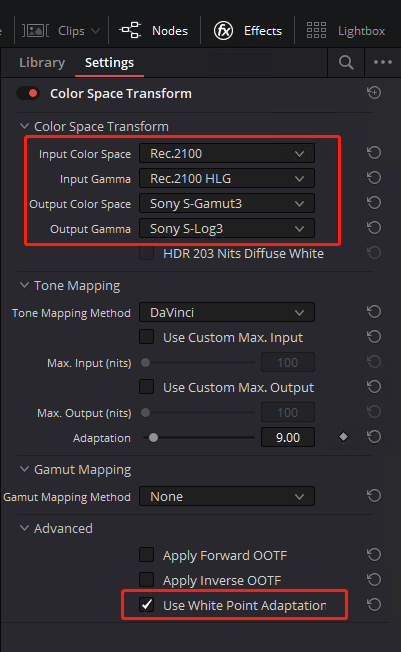
Use the 「Color Space Transform」 effect from the 「Effects Library」 to convert HLG Rec.2100 to the target log space. In the example shown, it’s converting to 「Sony S-Log3 S-Gamut3」.
For 「Tone Mapping Method」, I personally prefer 「Saturation Mapping」.
Be sure to turn off both 「Apply Forward OOTF」 and 「Apply Inverse OOTF」.
Node 3:
Apply the LUT. Here, I’m using the official 「Sony LUT」 for converting S-Log3 to personalized color.

Node 4:
This step is to export a LUT that works for both HDR and SDR in QooCam Studio. The HDR to SDR conversion in Studio is from 「Rec.2100 HLG」 to 「Rec.709 Gamma 2.2」.
Use the 「Color Space Transform」 effect from the 「Effects Library」 and set the 「Input Color Space」 to 「Rec.709」, 「Input Gamma」 to 「Gamma 2.2」, 「Output Color Space」 to 「Rec.2100」, and 「Output Gamma」 to 「Rec.2100 HLG」.
For 「Tone Mapping Method」, I prefer 「Saturation Mapping」.
Again, ensure that 「Apply Forward OOTF」 and 「Apply Inverse OOTF」 are both turned off.

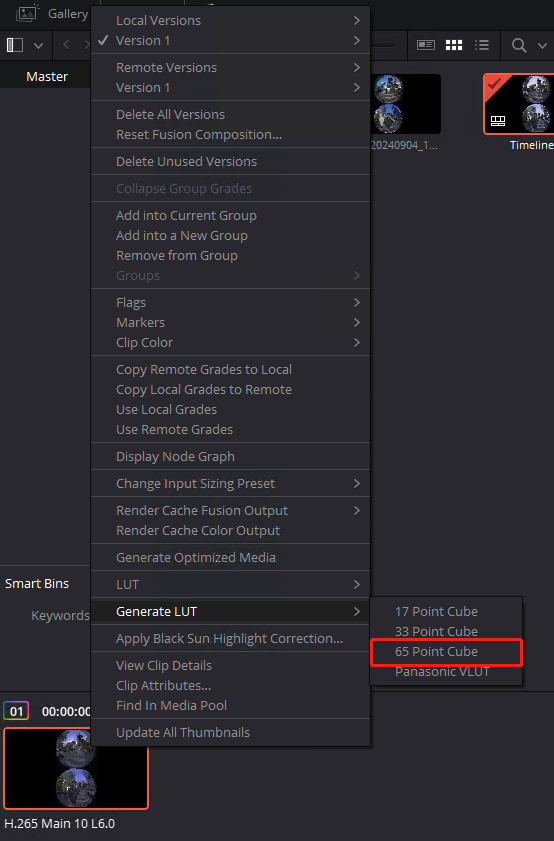
For the final step, export the LUT (65-point Cube) and import it into 「QooCam Studio」. This LUT will correctly apply the desired color style in QooCam Studio, whether exporting in HDR or SDR.
Similarly, if your final output in DaVinci is an SDR video, set the 「Color Science」 in 「Project Settings」 to 「DaVinci YRGB」, the 「Timeline Color Space」 to 「Rec.709 (Scene)」, and the 「Output Color Space」 to 「Same as Timeline」, then remove Node 4.
What are the differences between Optical Flow Stitching, Dynamic Stitching, and Close-up Optimization?
Optical Flow Stitching: Suitable for static scenes; produces a more natural-looking image.
Dynamic Stitching: Best for moving shots; helps reduce distortion and compression in mid-to-near stitch areas.
Close-up Optimization: Ideal for tight spaces or when objects are close to the camera (e.g., inside a car); improves detail rendering in the foreground.



